


UrbanSitter: Find Child Care
3.5697.00 Reviews
App Specs
- Version
- 13.10.0(16774)
- Updated On
- License
- Free
- Downloads
- 100,000+
- Developer
- UrbanSitter Inc.
- Categories
- Parenting
- Platform
- Android
Screenshots
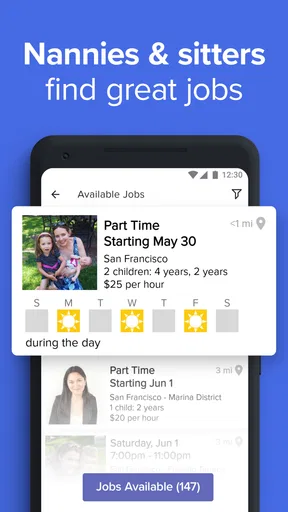
 Analysis by AppCompare
Finding childcare is not a decision I want to make in a rush, even when the need itself is urgent. UrbanSitter is designed to bring sitter searches, family connections, and booking tasks together on a phone, which can be useful when plans change during a busy day. I see its strongest appeal in helping parents explore options and organize a care request without starting every search from scratch. It still takes a parent’s judgment to decide whom to contact and whether a particular arrangement feels right.
When a search depends on a good connection
Searching, checking profiles, and communicating through the app are the moments when a dependable internet connection matters most. I would do the initial browsing somewhere with stable service rather than assume I can review sitter details or send a message while moving between buildings. That small bit of planning is especially sensible when you are arranging care for a specific time and need to hear back before making other plans.
UrbanSitter can also be useful for a search that starts well before the actual booking. If I know I have an evening commitment coming up, I can compare potential sitters in advance, look at reviews, and reach out while there is time to consider alternatives. That is a better fit for the app than waiting until the last few minutes and expecting any one person to be available. A last-minute request may still be worth trying, but I would keep a backup plan rather than treat a search result as a confirmed booking.
Using it between family errands
The phone-first format makes sense for the sort of short checks parents fit between school pickup, work, and household tasks. I might use a quiet moment to review profiles, then return later to continue a conversation or manage an arrangement. The practical trade-off is that a small screen encourages quick scanning, while choosing childcare deserves careful reading. I would save the final decision for a moment when I can concentrate on the sitter’s details and ask any questions that matter to my family.
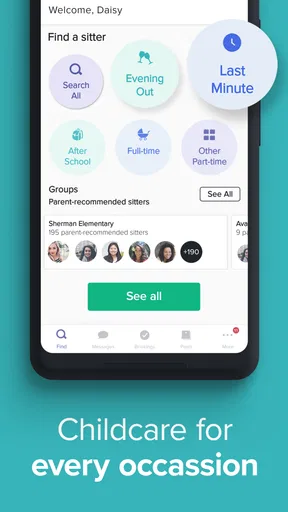
For a family with changing schedules, it helps to distinguish a one-off need from ongoing care before beginning a search. A sitter who suits a date night may not be the same person you want for regular after-school help, and a full-time arrangement calls for a different conversation from a short booking. Being clear about the kind of help you need can make the search more focused and reduce back-and-forth messages.
If a message or plan stalls
Any service that relies on messages can feel uncertain when a reply does not arrive as quickly as you hoped. I would contact more than one suitable candidate when the timing is tight, allow enough lead time for a response, and avoid treating silence as confirmation. If a booking detail changes, I would make sure the sitter and I have both acknowledged the new plan rather than relying on an assumption or an old message.
That is not a criticism unique to this app; arranging care involves another person’s schedule, and a digital search cannot guarantee availability or chemistry. The app can help structure the process, but parents still need to check that the practical details are clear: timing, expectations, and what the children need. For an urgent situation where there is no time to compare or speak with a candidate, calling someone you already know may be the safer first move.
Worth Reading Before You Choose

EA SPORTS FC Mobile 26 Is a Bigger Football Game, but It Takes Time

Flipboard Shows What News Apps Must Do Beyond the Feed

Switching to Android Auto Means Rethinking Your Driving Routine

Google Calendar Makes a Crowded Week Easier to Manage

Ludo King Makes the Most of the Minutes Between Plans

Baby Panda World Brings Quick Play to Modern Phones, but Its Game Library Feels Busy
Keeping mobile use thoughtful
Profiles and family details make the app more useful, but I would share only what is relevant to arranging care and keep children’s information purposeful. Before sending details, I would think about what a sitter needs to know at the search stage versus what is better discussed once a candidate is under serious consideration. That habit keeps communication focused and helps avoid putting sensitive family context into an early message unnecessarily.
Parents should also consider how much of the process they want to handle on a phone. Browsing and coordinating can be convenient in short bursts, but comparing several people carefully may be easier when you can give it your full attention. I would use the app to organize the search, then take time to make a deliberate choice rather than letting a notification or a busy commute set the pace.
Getting Started with UrbanSitter
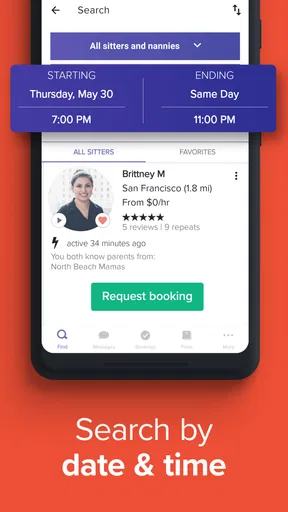
So, here's the deal: once you download UrbanSitter, the setup is a breeze. You create a profile, add your kiddos' details, and you’re good to go. The app's interface is super intuitive, which is always a win when you're juggling a zillion things. You can search for sitters by availability, location, and even specific skills or languages. Handy, right?
Finding the Perfect Match
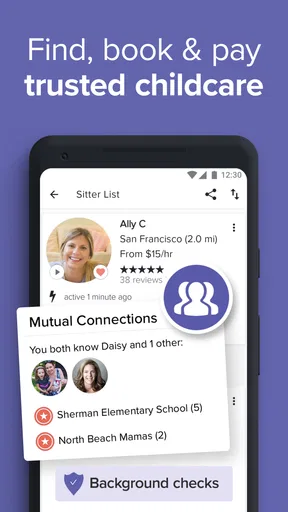
One of my favorite features is the ability to see reviews and ratings from other parents. It’s like a little Yelp for babysitters. You can also view detailed profiles that include background checks, so you know you're not just leaving your little ones with some random person. Plus, you can book sitters for one-off gigs, part-time, or even full-time help. It’s all about what you need.
The app also lets you connect with sitters your friends and neighbors have used. If you’re like me and trust your best friend's judgment more than your own, this feature is pure gold. It brings a whole new level of comfort knowing your pals have given their stamp of approval.
Ease of Use and Reliability
Now, let’s talk about usability. Navigating the app is pretty straightforward. The developers definitely had busy parents in mind when designing it. You can manage bookings, payments, and even communicate with sitters all within the app. No more clunky emails or texts that get lost in the shuffle.
Payments are seamlessly handled through the app, which is fantastic because who really carries cash these days? It’s all digital, quick, and secure. The transparency with costs upfront prevents any awkward money exchanges at the end of the night.
Community and Support
Another cool aspect worth mentioning is the community vibe. UrbanSitter hosts local events where you can meet sitters in person. It’s perfect if you’re the kind of person who likes to put a face to a name before leaving your kids under someone’s care. Plus, if you ever hit a snag, their support team is pretty responsive. They’ve got your back in case anything doesn’t go as planned.
And if you’re wondering, yes, there’s a membership fee. But honestly, the peace of mind knowing your kids are in capable hands is worth every penny. It’s like investing in your own sanity.
Final Thoughts
All in all, UrbanSitter is a nifty app that takes a ton of stress out of finding care for your kiddos. The app is easy to use, packed with useful features, and most importantly, it connects you with sitters you can trust. Whether you need someone for a date night, a last-minute emergency, or regular after-school help, this app has you covered. Give it a try, and you might just find your new go-to for childcare.
A practical way to shortlist candidates
One useful approach is to treat the first search as a shortlist, not a final decision. I would filter by the practical needs that matter for the booking, then compare a small number of profiles rather than scrolling indefinitely. Reviews can give helpful context, but I would read them as one part of the picture: a family’s experience may not match my children’s routine, expectations, or schedule. The profile, the conversation, and my own comfort should all contribute to the choice.
Connections to sitters used by friends or neighbors are particularly valuable when they lead to a specific conversation. I would ask the person who made the recommendation what kind of care they used and what they found reliable, rather than treating a familiar name as automatic approval. A recommendation is a strong starting point, not a substitute for checking whether the arrangement works for my household now.
What the app is best suited to
I think UrbanSitter makes the most sense for parents who want to explore local care options, compare profiles, and coordinate occasional or recurring help in one place. It may be especially useful after a move, when a family has not yet built a dependable local network, or when a regular sitter is unavailable and the parent wants to look beyond personal contacts. The social connections can make that search feel less anonymous, while reviews offer another perspective to consider.
It is less suited to someone who already has a trusted caregiver and only needs a simple way to confirm a shift. In that case, a direct message or calendar may be quicker. It is also not a replacement for a parent’s own screening and discussion. I would not choose a sitter solely because a profile looks polished or because an app makes the logistics feel easy; comfort with the person and clarity about the care remain essential.
A realistic evening-planning example
Imagine a work commitment appears for the following week and your usual sitter is booked. I would open the app while I have a few quiet minutes, search for candidates whose availability and location fit, and use the profiles and parent feedback to narrow the list. Then I would contact promising people early, explain the hours and the children’s basic needs, and wait for a clear response before treating any option as viable. If the first person cannot do it, there is still time to ask another candidate or call a trusted neighbor.
That workflow is more useful than searching in a panic at the door. It also makes the app’s convenience more realistic: it can help you organize discovery and communication, but it cannot make another person available or remove the need to agree on details. For recurring after-school care, I would use the same staged approach, but spend more time discussing routines and expectations before settling into a schedule.
How it differs from familiar alternatives
The usual alternative is asking friends, relatives, or a neighborhood group for a recommendation. Those sources can be excellent when they produce a person you already trust, but they may offer a narrower pool or take time to respond. UrbanSitter gives parents a way to browse profiles and reviews alongside connections to people their community has used. I see that combination as its main distinction: it can widen the search without asking you to ignore personal referrals.
A direct agency or a long-standing nanny arrangement may be a better fit for families seeking a highly guided hiring process or a stable, formal relationship. A casual group chat may be faster when the need is minor and someone familiar is already available. UrbanSitter sits between those approaches: it is a discovery and coordination tool, not a guarantee that every search will end with the right match. Choosing between it and another route depends on urgency, the level of continuity needed, and how much screening the parent wants to do personally.
Costs, expectations, and careful decisions
UrbanSitter is free to download, but the published review describes a membership fee, so I would check the current terms in the app before relying on it for a particular plan. The cost of care itself and any membership arrangement are separate considerations in a family budget. I would compare the expected value against how often I need to find new care, rather than assuming the app will be worthwhile for every household simply because the initial download costs nothing.
Its average rating is 3.4 from around 1.8 thousand ratings, with about 698 reviews, and it has passed 100 thousand installs. Those figures suggest the app has an established audience, but they do not tell me whether a particular sitter is a good fit or whether the experience will suit my area. I would use other parents’ feedback as a prompt to assess the service realistically, not as a replacement for a careful conversation and a clear booking.
Who should take a closer look
UrbanSitter is worth considering if you regularly need babysitting, want to compare more than one local option, or value seeing community recommendations alongside sitter profiles. The app comes from UrbanSitter Inc. and is in the parenting category. It is free, carries an Everyone age rating, and its current version is 13.8.0(15940); it was released on April 21, 2015, and requires Android 8.0 or later. Those details make it straightforward to judge basic compatibility, while the decision to use it still comes down to your care needs and comfort with app-based coordination.
On the other hand, I would skip it if you need a guaranteed immediate placement, prefer all arrangements to happen through a service with a more hands-on hiring process, or do not want to manage searches and conversations yourself. It is also a poor fit if you are not comfortable making a personal judgment after reviewing profiles and speaking with a candidate. In those situations, a known caregiver, a direct recommendation, or another care arrangement may be more reassuring.
My connectivity verdict
For me, UrbanSitter’s strength is bringing the search and practical coordination into a mobile workflow, with reviews and community links helping parents decide whom to approach. The trade-off is that useful decisions depend on being able to load information and communicate, while a successful booking still depends on availability and mutual agreement. I would browse ahead when possible, keep a backup for time-sensitive plans, and use a stable connection for important messages rather than count on a last-minute search to solve everything.
UrbanSitter is a helpful option for finding and organizing childcare, particularly when a family wants to broaden its local choices without losing the value of personal recommendations. It is not a shortcut around screening, and it will not be the best route for every household. If you are comfortable staying involved in the decision and want a more organized way to explore sitters, I think it is worth a look; if you already have a dependable caregiver or need guaranteed urgent coverage, another approach may serve you better.
Pros
- User-friendly interface for quick navigation.
- In-app messaging keeps communication secure.
- Background checks on caregivers for safety.
- Wide network of experienced sitters available.
- Customizable search filters for specific needs.
Cons
- Some services require a subscription fee.
- Limited availability in smaller towns.
- Occasional app crashes reported by users.
- Booking fees may apply for certain sitters.
- Not all sitters have extensive reviews.
FAQs for UrbanSitter: Find Child Care
What is UrbanSitter, and how does it work?
UrbanSitter is an app designed to connect parents with trusted babysitters and nannies. Users can browse profiles, read reviews, and book caregivers directly through the app. It utilizes a community-based approach, allowing parents to see sitters used by people they know and trust, making the process of finding reliable childcare easier.
Is UrbanSitter safe to use for finding childcare?
UrbanSitter prioritizes safety by allowing parents to see reviews and ratings from other users. Additionally, caregivers undergo background checks. Parents can also view mutual connections and recommendations. However, it’s advisable for parents to conduct personal interviews and checks to ensure the sitter meets their specific safety standards.
How do I book a sitter through UrbanSitter?
Booking a sitter on UrbanSitter is straightforward. After signing up, you can browse through sitter profiles, filter based on your needs, and read reviews. Once you've found a suitable sitter, you can view their availability and send a booking request directly through the app, confirming details and payment.
What costs are associated with using UrbanSitter?
UrbanSitter offers a subscription model for parents, with monthly or annual plans providing unlimited access to the app's features. The costs can vary, so it's essential to check the app for the latest pricing. Sitters set their own rates, which parents agree to during the booking process, ensuring transparency.
Can I cancel or reschedule a booking on UrbanSitter?
Yes, UrbanSitter allows parents to cancel or reschedule bookings within the app. However, it's important to check the cancellation policy of individual sitters, as fees may apply. Communicating directly with the sitter for any changes helps ensure a smooth process and maintains good relationships.


